

Event setup
Running an event again
Duplicate an event you have run before and change only what is new: the name, the date and anything you leave out. The copy starts as a draft, and nobody is told until you publish.
How do you run an event again?
Open the event in Event admin and choose Duplicate at the top of Edit event. It is also on each event in your hub's Events list, and on Create event, under Running something you've run before?
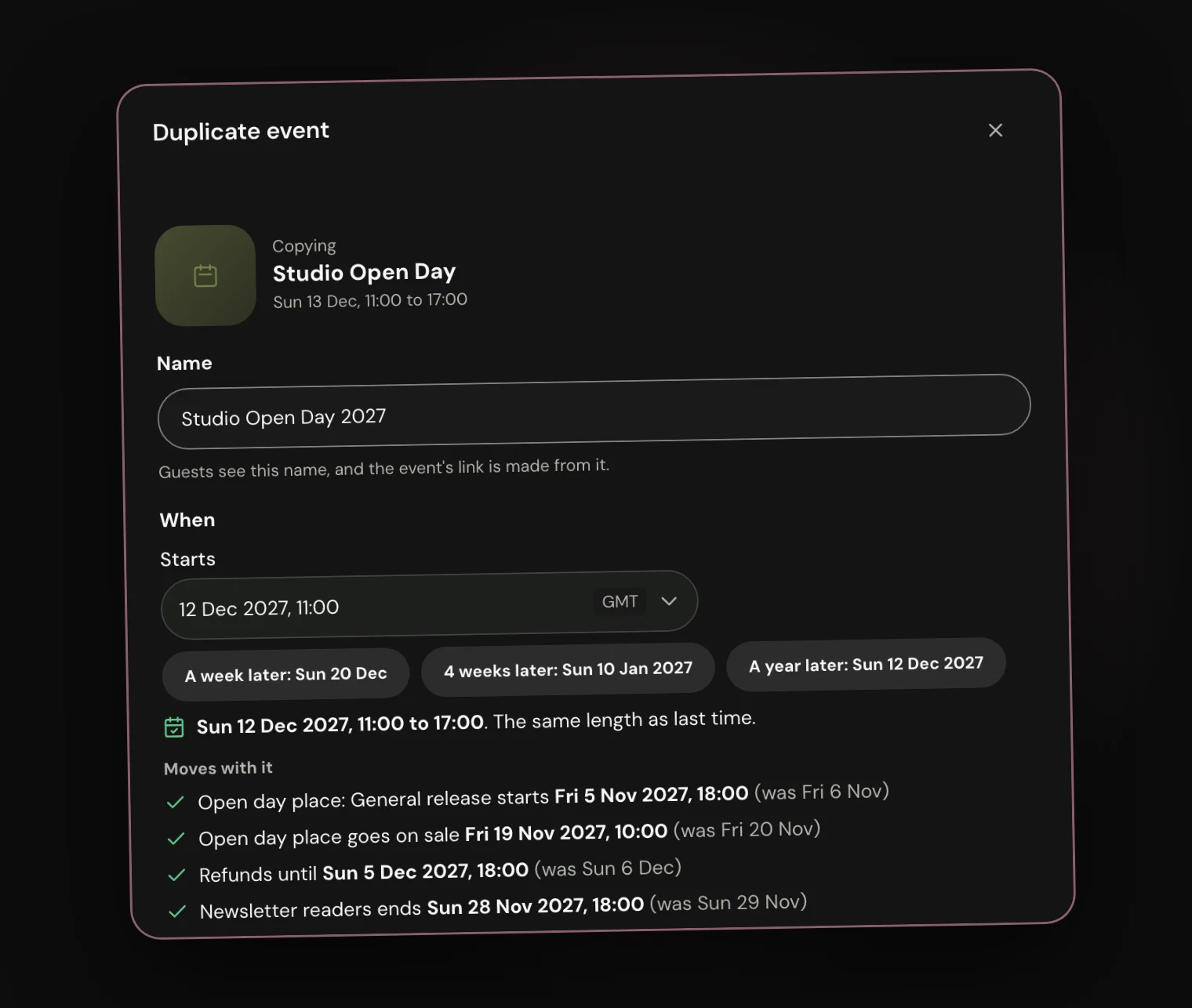
Give the new event its name and start date. A week later, 4 weeks later and A year later fill the date in for you, on the same day of the week.
Every date that belongs to the event moves with it by the same amount: sales phases, when tickets go on sale and when sales close, refunds, discount codes and the shop. The sheet lists them before you copy, and flags any that would already have passed.
If the event runs over several days or times, each one moves with it, and you can untick any you don't need. Owners, Admins and Managers can duplicate an event. If an event opens to groups first, only Owners and Admins can.
What comes across, and what doesn't?
Everything that sets the event up comes across, and you can switch off any part: tickets and prices, forms and questions, the event guide, the line-up, the flyer and banner, discount codes and shop items.
Discount codes start again with no uses. Shop items start with no stock, and the shop stays closed until you open it.
Nothing about people or money is copied: who bought tickets, orders and money, check-ins, messages and chats, updates you sent, invitations and photos.

What do you see once the copy is made?
Create draft opens the new event's Edit event, with a Duplicated summary at the top. It shows the new dates, your tickets with last time's prices and limits, and anything to check before you publish, such as the flyer or your team.
Only the people who run your hub can see the draft. Its tickets are not on sale yet, and nobody is told anything until you publish.

Can you ask the same team again?
Yes. Your team starts empty, and the new event's Staff page offers Ask last time's team again: everyone who helped, each with their role.
Untick anyone you don't want this time, then send the invitations. Nobody hears anything until you do, and each person says yes or no as they would to any invitation.

What it cannot do
- Copy who came, or any orders, money, check-ins or messages.
- Bring the event's chats across. Make new ones for the new event.
- Copy a batch of one-use discount codes. Make a new batch for the new event.
- Ask last time's team again once the new event is published. Send the invitations while it is a draft.
- Copy an event into another hub.