


Hub groups
Coming soon.
Tickets for groups
Give a group its own price, let it buy before everyone else, or keep a ticket just for it. Members buy as usual, with no code to share.
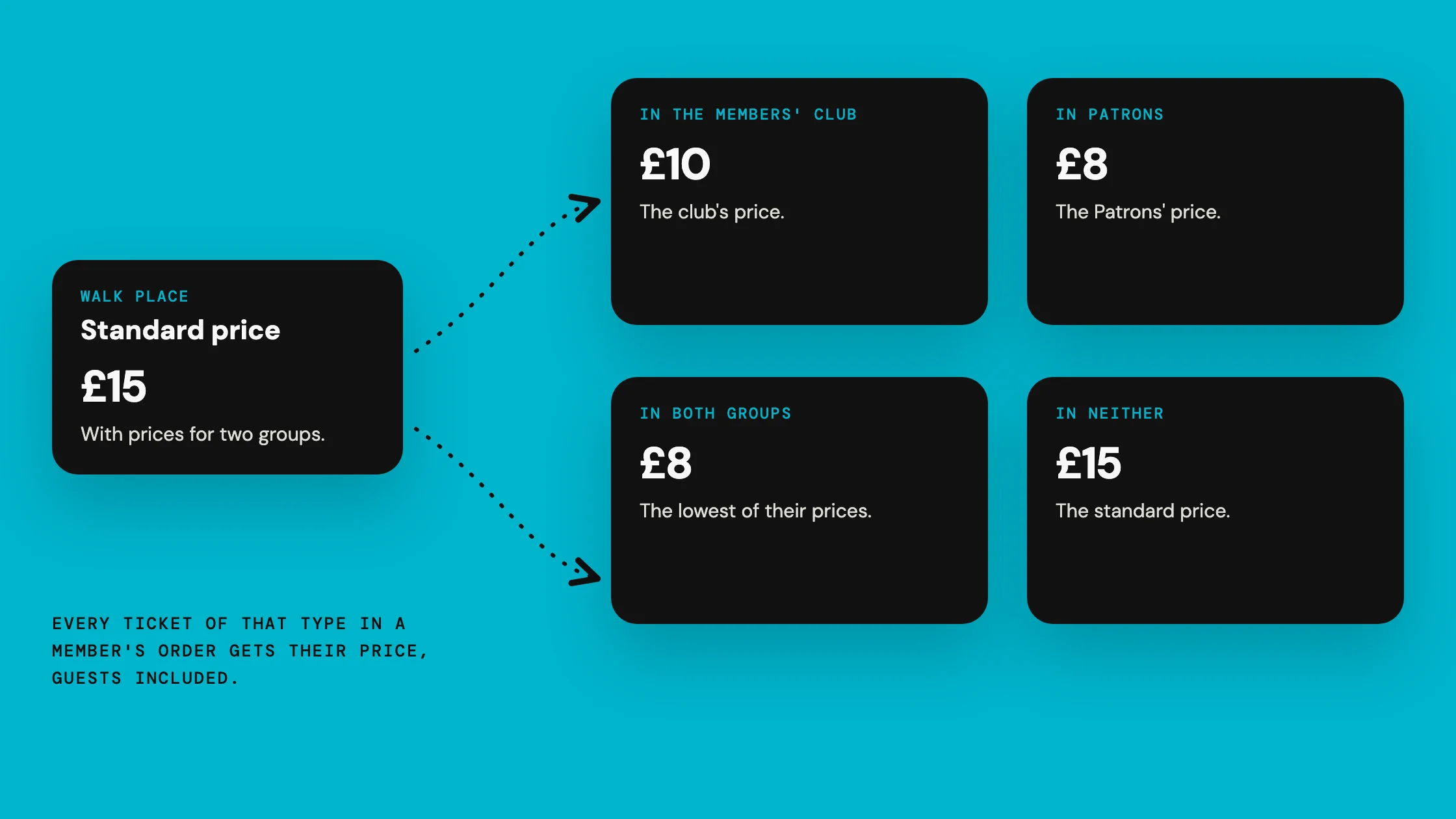
How do you give a group its own price?
Edit a paid ticket in Event admin. Each sales phase has Prices for groups: choose a group and what its members pay.
A member price is at least £1.00 and below the ticket's standard price. Each sales phase can have prices for up to 10 groups.

Can a group buy before everyone else?
Yes. In the ticket's sales, choose the date everyone can buy from, then add a group under Buy first with its own earlier date. Up to 10 groups can each have one.
Members of the group see that their sale is open, and buy from the same tickets at their price. Everyone else sees only the date they can buy from.

Can a ticket be just for a group?
Yes. Under Who can buy it, choose Only for selected groups and pick up to 10. Only people in them can buy it, be named on it or be given it.
For open groups, you can show it to everyone as For the group, with no price. Otherwise nobody else sees it.

What do members see?
Signed in, a member sees their price marked Member price, with the standard price crossed out.
It applies to every ticket of that type in their order, guests included. Only the buyer needs to be in the group.

Can everyone else see what members pay?
Only if you tick Show the price to everyone, which open groups offer. Visitors then see what members pay, with Sign in.
A hidden group's price is never shown to anyone outside it.

What if someone is in two groups, or has a code?
- In two groups
- They pay the lower of their prices.
- With a discount code
- They get whichever is lower, the member price or the code. Never both.
- Left the group
- The price is fixed when they go to pay. Someone no longer in the group by then pays the standard price, and a ticket they already have stays valid.
Where do you see what members bought?
The event report counts tickets bought at member prices, and what buyers paid for them. The attendee download names each ticket's group.
What it cannot do
- A free ticket cannot have a member price. To give a group free places, make a free ticket only for that group.
- Bundles do not get member prices, and cannot include a ticket only for groups.
- A ticket only for groups cannot be sent as an invitation or offered by email.
- Buying without signing in, or joining the hub and buying in one go, pays the standard price.
- Members of another hub hosting the event with you pay the standard price.