




Member import
Organiser workflow
What a hub Owner or Admin does to bring a member list into Hubbaly, from the file to the results.
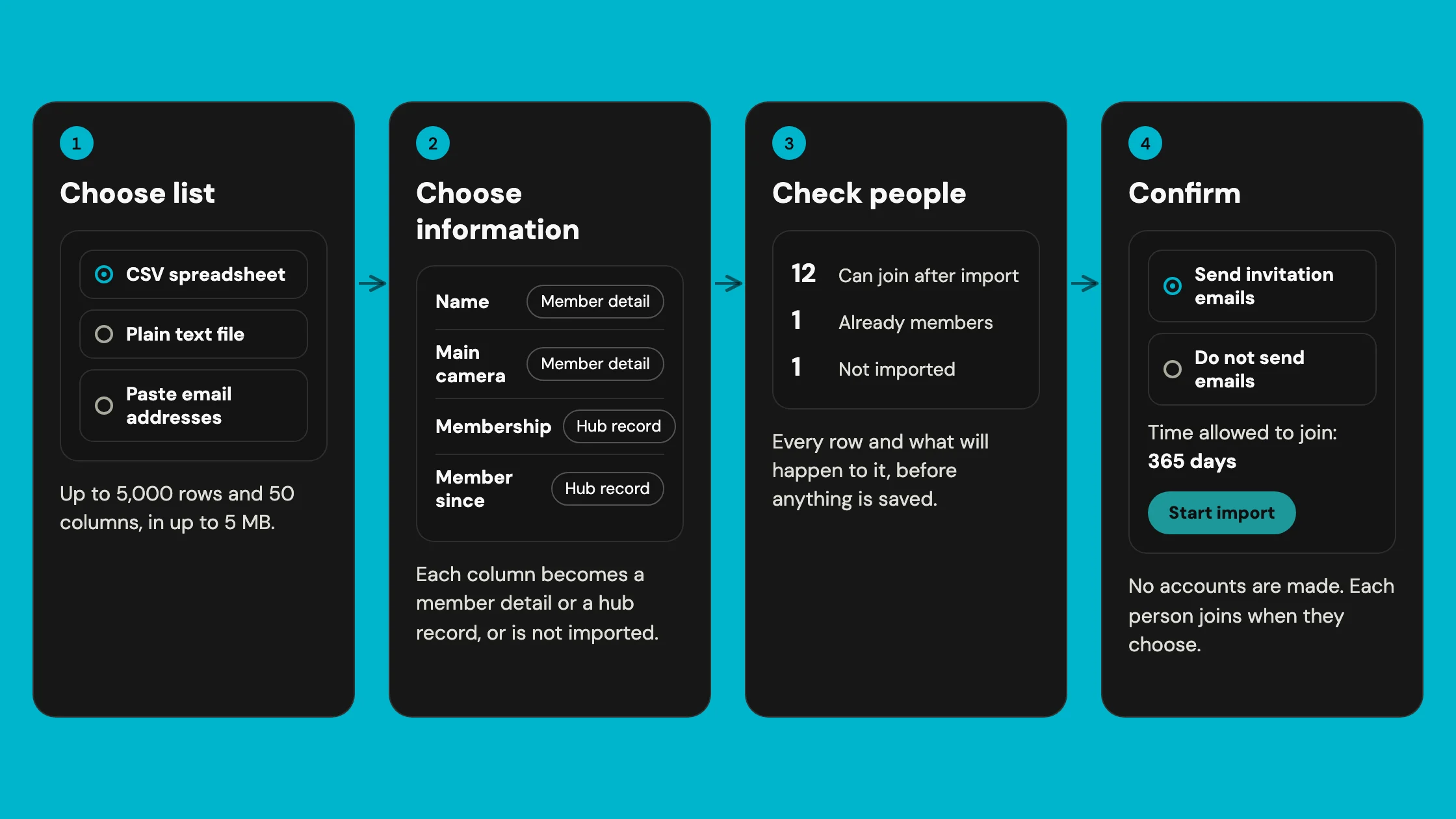
What can I bring in?
A CSV spreadsheet, a plain text file with one email address on each line, or a list pasted straight in.
A list can hold up to 5,000 rows and 50 columns, in up to 5 MB. A single cell can hold up to 2,000 characters. One column must be the email address.
How do I choose what happens to each column?
Choose information sets each column to one of three things. Set all remaining columns does the rest in one go.
- Member detail
- Belongs to the person. They see it when they join and can change or remove it later.
- Hub record
- Belongs to your hub. Only hub Owners and Admins can see it, and the person cannot change it.
- Do not import
- Nothing from this column is saved.

What does Check people show?
Every row of your list, with what will happen to it. Nothing is saved yet.
The counts say how many can join after import, are already members, or are not imported. Search and filters find a row, and Correction CSV lists the rows to fix in your file.
A check stays good for two hours. Change the list or your choices, and Hubbaly checks again.

What happens when I start the import?
Confirm shows the totals once more. Choose Send invitation emails or Do not send emails, and how many days people have to join. It starts at 365 days.
Use this file for current members too fills only the details your members have left empty. It's off unless you turn it on.
Confirm you have authority to share the list, then press Start import. Hubbaly makes no accounts and nobody a member. Each person joins when they choose to.
What do the results show?
Each row has a membership outcome and an invitation outcome:
- Can join now
- The invitation is active, and the person hasn't joined yet.
- Joined from import
- The person used the invitation and joined.
- Already a member
- They were in your hub already. Nothing changed for them.
- Skipped
- The row wasn't imported, for example a repeat of an earlier row.
- Needs attention
- The row couldn't be imported as it is, such as an email that isn't valid.
- No longer active
- The invitation was used, declined, revoked, expired or closed.

How do I put a mistake right?
An imported email address is never edited in place. Revoke the row, correct your file, and use Import a corrected file.
Give people more time to join extends the deadline, up to 730 days from the original import. Stop remaining people joining ends it for everyone who hasn't joined. Nobody who joined is removed, and saved hub records stay.
What it cannot do
- It can't create accounts or make anyone a member. Each person joins themselves.
- It can't change an imported email address. Revoke the row and import it again.
- It can't be run or seen by Managers. Only hub Owners and Admins.
- It can't make an imported detail required for joining or checkout.
- It can't take more than 5,000 rows at once. Run another import for the rest.